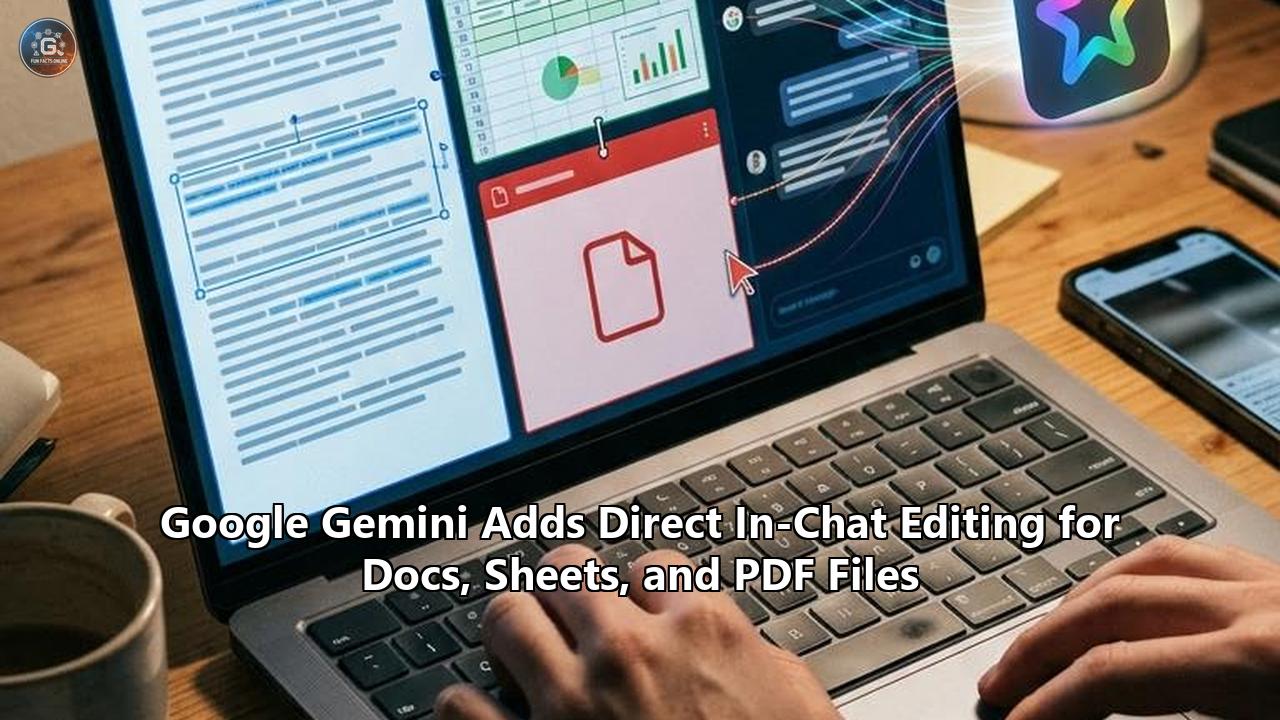
Google updated its Gemini application on October 29, 2026, rolling out native in-chat file preview and direct editing capabilities across Google Docs, Google Sheets, slide presentations, PDFs, Markdown, plain text, and source code. The update dismantles the longstanding export barrier in conversational artificial intelligence. Rather than forcing users to download generated deliverables or copy raw text blocks into separate desktop applications to correct a single sentence or adjust a formula, the interface now embeds a full-screen interactive editor directly within the conversational thread.
The release expands upon the foundational file-generation capabilities Google introduced on April 29, 2026, when the platform first allowed users to produce structured documents directly from conversational prompts. While that earlier milestone solved the output format problem by generating native spreadsheets and text files, it left the editorial feedback loop fragmented.
Users were caught in an awkward shuffle: draft in chat, export to external software, identify errors, and either manually revise off-platform or copy corrected blocks back into the prompt box to re-establish contextual awareness.
The latest release closes that operational circuit. Users can expand any generated file into a full-screen view, type manual revisions directly into the canvas, highlight specific passages to prompt Gemini for targeted rewrites or layout tweaks, and interrogate the document through contextual follow-ups without leaving the chat window.
Availability spans both consumer and Google Workspace accounts globally across all languages supported by the Gemini app. A clear architectural boundary governs platform distribution: PDF previewing and direct editing operate across both mobile applications and desktop web browsers, while rich productivity files—including Google Docs, Sheets, Slides, and raw code—are strictly limited to desktop web browsers at launch.
Workspace administrators were given no granular controls to disable the editing interface independently; access is tied directly to the broader Gemini service entitlement within the organization.
Beyond the immediate utility for knowledge workers, students, and developers, this release provides a revealing case study in software evolution. It exposes how natural language chat interfaces—originally celebrated as the ultimate universal user interface—suffer from structural ergonomic flaws when applied to real-world knowledge production.
Examining the mechanics, human-computer interaction principles, and technical compromises underlying Google Gemini editing features uncovers how conversational agents are transforming from ephemeral oracle-style message feeds into stateful, direct-manipulation workspaces.
Traditional Generative AI Loop (Fragmented):
[Prompt] ──> [Chat Stream] ──> [Export/Download] ──> [External App: Word/Docs] ──> [Manual Edits / Desync]
                                                                                            │
                                   [Re-upload / Paste New Context] <────────────────────────┘

Gemini In-Chat Canvas Architecture (Unified):
              ┌─────────────────────────────────────────────────────────┐
              │ Gemini Unified Workspace Interface                      │
[Prompt] ──>  │  [Conversation History] <──> [Interactive Canvas]       │ ──> [Direct Save to Drive / Push]
              │          │                         │                    │
              │          └── [Targeted Rewrites] ──┴─ [Direct Keystroke]│
              └─────────────────────────────────────────────────────────┘
The Operational Mechanics of In-Chat Document Modification
The implementation of native document editing inside the Gemini application operates on three distinct interaction tiers: manual direct authoring, targeted sub-tree regeneration, and multimodal contextual generation. Understanding how these tiers integrate into the web client reveals a substantial shift away from the classic chat completion loop toward a hybrid Document Object Model (DOM) management system.
Direct Keystroke Authoring on a Unified Canvas
In standard conversational models, model outputs exist as static text responses formatted via basic markdown parsers. If a generated project charter contains an incorrect completion date, the user has historically faced two options: prompt the model to "rewrite the document with the date changed to November 14," which triggers a full sequence regeneration, or copy the entire text out of the client to edit locally.
Under the new model, expanding a deliverable triggers an in-place rich text or spreadsheet canvas. The canvas operates with standard WYSIWYG (What You See Is What You Get) affordances. Users can place an insertion caret anywhere within the generated text, delete characters, rewrite sentences, restructure headings, and add bullet points.
In Google Sheets files, users can modify cell values, edit standard formulas, and adjust columns without triggering a network call to the underlying Large Language Model (LLM).
This separation of concerns between local client keystrokes and remote inference tokens is fundamental. Simple mechanical updates—correcting an employee name, fixing an internal project code, or deleting an unnecessary paragraph—incur zero model latency, zero inference compute costs, and zero risk of introducing secondary hallucinations into adjacent passages.
User Action Types and Execution Routing:

User Action                 Execution Environment       Inference Cost      Latency Profile
───────────────────────────────────────────────────────────────────────────────────────────
Typing a sentence fix       Client-side DOM/Canvas      Zero tokens         Instantaneous (0ms)
Modifying a cell value      Client-side Sheet Engine    Zero tokens         Instantaneous (0ms)
Highlight: "Make punchier"  Selective Context Window    Localized tokens    Sub-second / Fast
Highlight: "Turn to chart"  Multimodal Agent Call       Transform tokens    Low (1-2s)
Prompt: "Re-index data"     Full Document Pipeline      Full doc tokens     Standard inference
Targeted Selection and Inline Prompting
The second interaction mode addresses localized iterative refinement. Rather than issuing broad conversational requests that require the model to parse the entire previous interaction history, users highlight a discrete substring or table array within the open canvas.
Highlighting summons a contextual action panel that allows two distinct pathways:
- Targeted Refinement Prompts: A dedicated input field accepts micro-instructions specific to the selected segment (such as "tighten this paragraph," "convert this numbered list into a comparison table," or "translate this clause into German").
- Contextual Interrogation: The user can highlight a complex formula, a legal liability clause, or an obscure data point and query the system ("Where did this estimate originate?" or "Explain the tax implications of this sentence") without altering the document text.
By constraining the model’s generative attention to a targeted node within the document structure, the system avoids context degradation. The LLM performs an in-place semantic replacement, preserving the structural boundaries of the surrounding document.
This behavior mirrors modern Integrated Development Environments (IDEs) where automated refactoring tools modify specific abstract syntax sub-trees without recompiling the entire code base.
Multimodal Pipeline Ingestion
The capabilities are tightly coupled with Google’s multimodal foundation models. In the primary demonstration scenario provided by the Gemini team, a student captures photographs of physical, handwritten lecture notes and uploads them to the prompt console.
The user issues a prompt directing the model to extract the key arguments and format them into an organized PDF study guide containing structured headings, visual summaries, and practice questions.
Once the PDF is synthesized, it renders in the chat interface via an integrated PDF reader and annotation layer. The user can open the file in a full-screen window to resolve transcription ambiguities in the handwritten text, highlight diagrams to command Gemini to regenerate them as cleaner data visualizations, and export the finalized PDF locally or save it directly to Google Drive.
This fluid progression—from visual analog input to structured machine output to interactive semantic editing—illustrates how Google Gemini editing features bridge unstructured real-world data and structured, publishable artifacts.
Architectural Tension: Stateless Conversations vs. Stateful Documents
The technical transition from simple message streams to live, in-chat editable documents reveals a deeper challenge in modern AI system design: the architectural clash between stateless token generation and stateful document management.
Data Persistence and Token Context Architecture:

+-------------------------------------------------------------+
|                      Gemini Client App                      |
|                                                             |
|   Chat Timeline (Stream)          Interactive File Canvas    |
|   +---------------------+         +---------------------+   |
|   | User: "Make a plan" |         | Document Canvas     |   |
|   | Gemini: "Here it is"| <=====> | [Manual DOM Edits]  |   |
|   | User: Highlight box |         | [Version Checkpoint]|   |
|   +---------------------+         +---------------------+   |
+----------------------------------------------│--------------+
                                               │
                         WebSocket / HTTPS Sync│ (JSON Patch / Operational Transforms)
                                               ▼
+-------------------------------------------------------------+
|                     State Management Layer                  |
|                                                             |
|   Context Serialization Engine                              |
|   - Reconstructs active document state                      |
|   - Injects current document AST into system context        |
|   - Avoids token-limit overflow via selective windowing     |
+-------------------------------------------------------------+
                               │
                               ▼
+-------------------------------------------------------------+
|                     Gemini Model Engine                     |
|                                                             |
|   - Long Context Processing Window                          |
|   - Multimodal Ingestion (OCR / Vision / Layout)            |
|   - Localized Token Replacement Infill                      |
+-------------------------------------------------------------+
The Limitations of the Pure Chat Interface
For the first four years following the emergence of mainstream conversational interfaces, AI platforms relied almost entirely on an append-only timeline. A user prompt arrived at the inference endpoint, the model returned a streaming stream of tokens, and the resulting block was appended to a chronological message thread.
This interaction pattern works effectively for informational queries, code snippets, brainstormed bullet points, and linear Q&A. However, when applied to production-grade knowledge tasks, the append-only paradigm creates severe systemic friction:
- Linear Context Bloat: Every revision requires a full copy of the text to be generated anew, rapidly consuming the context window and polluting the chat thread with redundant, near-identical drafts.
- Loss of Editorial Precision: Natural language is an imprecise tool for micro-edits. Instructing an LLM to "change the second occurrence of the word 'strategy' in paragraph four to 'tactics'" is prone to model misunderstanding, whereas a human user can execute the change with a mouse click and three keystrokes in under two seconds.
- Non-Deterministic Side Effects: Because autoregressive models predict the next token based on statistical probabilities across the entire prompt context, asking a model to regenerate a five-page document to update a single financial figure often inadvertently alters vocabulary, tone, and structural formatting elsewhere in the document.
State Synchronization and Document Object Models
To make in-chat editing functional, Google had to re-engineer the Gemini web client from a lightweight chat viewer into an asynchronous state management engine. When Gemini outputs a document, it no longer merely prints marked-up text; it instantiates a structured document model.
When the user modifies a heading or alters a table cell on screen, the client updates the underlying document tree. This tree must then be reconciled with the conversational context.
If the user subsequently returns to the chat prompt and types, "Now summarize the third section," the client cannot simply send the original chat history; it must serialize the updated document state—incorporating the user's manual keystrokes—and pass it into the model’s context window as the ground truth.
Handling this dynamic requires operational transformation or conflict-free replicated data types (CRDTs) operating between the client-side document canvas and the server-side prompt construction pipeline. If the synchronization layer fails, context drift occurs: the user sees one version of the document on the canvas, but the model answers questions based on an outdated token cache stored in its conversation history.
Google’s extensive experience engineering collaborative web-first productivity software—specifically Google Docs and Sheets—gives the company a formidable structural advantage in deploying robust, web-based state synchronization directly into browser runtimes.
The Broader Industry Pattern: The Death of the Chat Box Monoculture
Google’s rollout of direct editing features is not an isolated experiment. It represents an inflection point in a industry-wide effort to transcend the limitations of the classic conversational chat box.
The Evolution of Generative AI User Interfaces:

Phase 1: Pure Terminal (2022-2023)
+---------------------------------------+
| Prompt > Generate > Static Text Block |
+---------------------------------------+
Characteristics: Stateless feel, linear feed, copy-paste reliance.

Phase 2: Split-Screen Sidecars (2024-2025)
+-------------------+-------------------+
| Conversation Log  | Dynamic Artifact  |
| (Left Pane)       | (Right Pane)      |
+-------------------+-------------------+
Characteristics: Anthropic Artifacts, OpenAI Canvas, interactive previews.

Phase 3: Deep Native Workspace Canvas (2026+)
+---------------------------------------+
| Unified Interactive Workspace Canvas  |
| - In-place typing and cell editing   |
| - Native binary format support (PDF)  |
| - Bidirectional state synchronization |
| - Zero-export publication flows       |
+---------------------------------------+
Characteristics: Google Gemini editing features, embedded office suites.
The trajectory of generative AI interfaces can be mapped across three distinct design phases:
Phase 1: The Command-Line Chatbot (2022–2023)
The initial wave of consumer generative AI leaned entirely on the single-column chat feed popularized by early messaging software and customer support bots. Users interacted with high-parameter models through a plain input box at the bottom of the screen.
While accessible and low-friction, this design treated generative AI as an oracle rather than an instrument. Deliverables were viewed as outputs to be consumed or copied, not working materials to be manipulated.
Phase 2: Decoupled Artifacts and Sidecars (2024–2025)
The industry recognized the cognitive overhead of the single-column feed when Anthropic introduced "Artifacts" in mid-2024, followed shortly by OpenAI’s launch of "Canvas." These interfaces split the browser viewport into two panes: the chat conversation remained on the left, while a dedicated visual workspace appeared on the right.
Code, markdown documents, and SVG graphics were isolated into distinct visual containers that could be viewed, executed, and partially updated without cluttering the primary conversational history.
Phase 3: Deeply Integrated Native Workspaces (2026)
Google’s October 2026 release demonstrates the third phase: dissolving the boundary between chat stream, runtime editor, and enterprise document storage. Rather than limiting the auxiliary canvas to transient web code or generic markdown, Google brought the full machinery of office productivity suites directly into the conversational view.
A generated spreadsheet is not a static HTML table simulation; it is an active spreadsheet model capable of handling calculations, sorting, and direct export to enterprise clouds. A generated PDF is not an unalterable binary blob; it is an interactive document layer capable of being refactored, annotated, and rewritten in place.
This evolution confirms a core software principle: As generative tools mature, chat ceases to be the application itself and instead becomes an omnipresent control plane nested inside specialized workspaces.
Core Principle 1: Cognitive Ergonomics and the Elimination of Context Switching
The primary value driver behind the Google Gemini editing features is not sheer algorithmic intelligence, but cognitive ergonomics. By collapsing the generation-editing lifecycle into a singular interface, the system eliminates the hidden operational taxes that derail knowledge work.
Cognitive Switching Penalty Analysis:

[Fragmented Multi-App Workflow]
Step 1: Prompt AI Model
  │ (Attention focused on Chat Client)
Step 2: Review Generated Output
  │ (Mental parsing of raw text block)
Step 3: Export File / Copy-Paste
  │ (Context Switch: Desktop File System / Window Management)
Step 4: Launch Desktop Suite (Word / Excel / Acrobat)
  │ (Context Switch: Interface reorientation, toolbar parsing)
Step 5: Locate Errors & Execute Edits
  │ (Manual typing, formatting re-alignment)
Step 6: Sync Back to AI Thread for Next Steps
  ▼ (Context Switch: Mental re-grounding back to prompt box)
* Result: Attention fragmentation, high cognitive load, time loss.

[Gemini Unified In-Chat Workflow]
Step 1: Prompt Model
  │ (Focused on unified workspace)
Step 2: Review & Direct Canvas Edit
  │ (In-place typing, instant DOM update, zero window shift)
Step 3: Highlight Micro-Prompting
  ▼ (Localized agent assistance without application handoff)
* Result: Single attentional focus, preserved working memory.
The Heavy Toll of Application Shuffling
Decades of human-computer interaction research establish that context switching carries a measurable mental penalty. Studies led by Dr. Gloria Mark at the University of California, Irvine, demonstrate that it takes an average of 23 minutes and 15 seconds to regain deep focus after a significant work interruption.
Even micro-interruptions—such as toggling between browser windows, waiting for a desktop word processor to initialize, downloading an intermediate file, and navigating local directory folders—deplete working memory.
In the fragmented AI workflow, a user generating an executive brief experiences frequent context switches:
- Formulate prompt in AI chat.
- Read generated draft.
- Download draft as .docx or copy to clipboard.
- Open Google Docs or Microsoft Word.
- Paste content and correct formatting anomalies caused by the transfer.
- Make line edits to corporate terminology.
- Return to the browser to ask a follow-up question regarding data sources.
- Re-paste the updated document back into the AI window so the assistant is aware of the changes made in Step 6.
This friction, often termed "export debt," discourages users from taking full advantage of conversational assistants for multi-stage deliverables. When the barrier to small revisions is high, users either abandon the AI assistant midway through a project or settle for lower-quality, unedited AI output to avoid the hassle of multi-window editing.
Frictionless Interaction Loops
The Google Gemini editing features compress this multi-app loop into a single interaction surface. The user remains in an uninterrupted creative flow. The mental model shifts from managing software windows to sculpting an intellectual object.
Friction Metrics Comparison:

Metric                      Decoupled Chat & Export         Gemini In-Chat Canvas
───────────────────────────────────────────────────────────────────────────────────────────
Application Windows         2 to 4 separate windows         1 unified browser viewport
Time to First Keystroke     15–45 seconds (download/launch) < 1 second (click on canvas)
Token Overhead on Edits     Full document re-generation     Localized token infill
Document State Desync       High risk (manual re-upload)    Zero (shared state architecture)
Mobile Edit Feasibility     Extremely cumbersome            Supported for PDF documents
By lowering the barrier to manual intervention, Google encourages a more balanced division of labor between human and machine. The AI handles zero-to-one structural drafting, initial data collection, and syntactical formatting; the human editor steps in directly to inject institutional nuance, correct subtle factual discrepancies, and refine stylistic rhythm.
Core Principle 2: Precision Refinement via Sub-Tree Token Replacement
A persistent vulnerability of generative AI models is non-determinism during full-sequence generation. When a user asks an LLM to regenerate an entire document to adjust a single paragraph, the model recalculates statistical token probabilities across the whole document from scratch.
This architectural reality gives rise to the second major design principle embodied in in-chat editing: Precision editing requires structural isolation.
The Perils of Full-Document Regeneration
Consider a practical scenario: a financial analyst uses an AI model to draft an eight-page market assessment. The assessment contains accurate industry overviews, correctly cited macroeconomic metrics, and carefully structured comparison tables. However, on page six, the model misstates a company's year-over-year operating margin as 14% instead of 18%.
In an append-only chat interface, the analyst enters:
"Regenerate the report, but fix the operating margin on page six to 18%."
When the model processes this prompt, it does not simply execute a targeted database update. It streams hundreds of new tokens across pages one through eight. In doing so:
- It may introduce a factual hallucination on page two that was not present in the original draft.
- It may alter the professional tone of the executive summary on page one.
- It may reformat the comparison tables on page four into bullet points, breaking the layout.
- It consumes thousands of unnecessary output tokens, forcing the user to wait through a lengthy generation sequence.
This dynamic forces the user into an exhausting proofreading cycle: every time an instruction is given to fix one error, the entire document must be re-checked for newly introduced hallucinations.
Full Regeneration vs. Sub-Tree Targeted Infill:

[Full Document Regeneration - High Risk]
Original Doc: [Block A (Accurate)] -> [Block B (Accurate)] -> [Block C (Error)]
                                                                    │
User Prompt: "Fix error in Block C"                                 │
                                                                    ▼
Regenerated:  [Block A (Altered?)]  -> [Block B (Hallucination?)] -> [Block C (Fixed)]
* The model recalculates all tokens; unmanaged drift occurs across entire context.

[Sub-Tree Targeted Infill - Zero Drift]
Original Doc: [Block A (Locked)]   -> [Block B (Locked)]   -> [Block C (Targeted Highlight)]
                                                                    │
User Prompt: "Change margin to 18%"                                 │
                                                                    ▼
Updated Doc:  [Block A (Unchanged)] -> [Block B (Unchanged)] -> [Block C (Surgically Fixed)]
* Blocks A and B remain mathematically immutable. Inference is isolated to Block C.
The Architectural Solution: Infill and Node Masking
The inline highlight-and-edit capability introduced in Gemini addresses this systemic problem by establishing bounded inference domains.
When the user highlights a specific paragraph within a generated document and prompts, "Condense this down to two sentences," the system isolates the highlighted text as a sub-tree node. The surrounding sections of the document are marked as immutable.
The inference engine constructs an infill prompt:
- Prefix Context: The preceding document text (treated as read-only grounding context).
- Target Node: The highlighted text to be transformed.
- Instruction: The user’s specific inline prompt.
- Suffix Context: The subsequent document text (treated as read-only grounding context).
The model streams tokens only to replace the target node. Once the replacement reaches the boundary of the selection, generation terminates. The surrounding seven pages remain mathematically identical to their prior state.
This mechanism delivers three decisive operational advantages:
- Zero Hallucination Contagion: Immutable sections cannot be corrupted by the model during the revision step.
- Reduced Latency: Generating 40 tokens to replace a highlighted paragraph requires a fraction of the time needed to stream a complete 3,000-word file.
- Verification Efficiency: The user only needs to review the highlighted block, because the rest of the deliverable has not changed.
This surgical approach transforms conversational AI from a volatile text generator into a precise, dependable editorial collaborator.
Core Principle 3: Format Convergence Across Unstructured and Structured Boundaries
Knowledge work does not exist in a single format. A single enterprise initiative routinely spans fluid prose (Docs), structured relational data (Sheets), fixed-layout presentation assets (Slides), and immutable distribution formats (PDFs).
Historically, software tools forced a rigid segregation between these formats:
- Unstructured text went into word processors.
- Structured relational records lived in spreadsheets.
- Portable vector-and-raster representations were compiled into PDFs.
The integration of Google Gemini editing features across this spectrum marks an important step toward unifying these traditionally siloed formats.
Format Processing Matrix within Gemini Workspace:

Format Category     Underlying Architecture     Primary Challenge               Gemini In-Chat Capability
───────────────────────────────────────────────────────────────────────────────────────────────────────────────
Documents (Docs)    Linear Typographical DOM    Maintaining styling hierarchies In-place typing, inline tone/
                                                                                length adjustments
Spreadsheets        Relational Dependency Graph Formula integrity, syntax       Cell value updates, formula
(Sheets)                                        accuracy, multidimensional data tweaks, live chart swaps
Fixed Media (PDF)   Compiled PostScript/Vector  PDFs are historically display-  OCR ingestion, visual layout
                    Binary Stream               only, unyielding to text edits  reconstruction, annotation
Source Code         Abstract Syntax Tree        Syntactic validity, execution   Inline code refactoring, syntax
                    (AST) / Raw Text            sandboxing, indentation logic   highlighting, copy-free runs
Deconstructing the PDF Barrier
The most technologically demanding element of Google’s update is native, in-chat editing for PDF documents across both desktop and mobile platforms.
From a technical perspective, the Portable Document Format (PDF) was never designed to be an editable authoring format. Developed by Adobe Systems in 1993, PDF is essentially a digital printing protocol based on PostScript. It fixes characters, shapes, and images to exact, immutable two-dimensional coordinates on an absolute Cartesian plane ($x, y$).
In a standard PDF, words are frequently broken up into disconnected glyph clusters; there is no innate awareness of "paragraphs," "margins," or "reflowing text." Consequently, modifying a PDF has historically required specialized software that reverse-engineers the layout into an editable layer, often resulting in broken line wraps and misaligned fonts.
Google circumvents this historical barrier by utilizing Gemini’s native multimodal visual reasoning engines. When an uploaded or generated PDF is opened inside the Gemini editor:
- The system interprets the document simultaneously as a rendered visual image and as a parsed text stream.
- The model reconstructs the semantic hierarchy—identifying headers, columns, callout boxes, and tabular data.
- The editor exposes an abstraction layer that permits direct manipulation of typography and layout elements directly on the rendered canvas.
This architectural bridge allows users to perform tasks that previously required expensive specialized toolkits—such as snapping a photo of a whiteboard, having Gemini format it into an organized PDF document, and immediately cleaning up the text layout directly on an Android or iOS device.
Relational Dynamics in In-Chat Spreadsheets
Spreadsheets present a completely different set of structural challenges. Unlike a word processing document, where text flows sequentially from top to bottom, a spreadsheet is a non-linear network of dependent cells. Changing the numerical value in cell B4 can trigger a cascading series of recalculations across dozens of linked sheets and charts.
By embedding spreadsheet editing inside the chat interface, Gemini allows users to interact with data relationally:
- Micro-Adjustments: A user can manually modify individual row items directly on the grid to reflect verified financial figures.
- Macro-Transformations: By highlighting an entire table array, the user can instruct Gemini: "Convert this quarterly cost summary into an interactive monthly amortization schedule," or "Generate a formula that calculates variance between columns C and D, flagging negative margins in red."
- Visualization Swaps: Users can prompt Gemini to convert raw spreadsheet tables into clear charts on the fly, rendering visual assets directly alongside the data grid.
This eliminates the awkward workflow where an AI generates raw CSV text, which the user must copy, paste into a desktop spreadsheet program, split into columns, manually format with borders, and write formulas for from scratch.
The chat surface becomes a fully functional analytical workspace.
Enterprise Realities: Governance, Data Privacy, and Administration
While direct in-chat editing provides undeniable workflow efficiencies, its arrival inside corporate environments introduces notable enterprise governance challenges. The way Google has structured administrative controls and data handling models reveals a deliberate enterprise product strategy.
Data Handling and Privacy Boundary Matrix:

User Account Tier           Model Training Policy               Human Review Mechanism      Admin Toggle Availability
─────────────────────────────────────────────────────────────────────────────────────────────────────────────────────────────
Consumer Gemini             Uploaded files and chat prompts     Select sessions may be      User-controlled toggle via
(Free / Personal)           may be used to train models if      inspected by human          "Keep Activity" settings;
                            "Keep Activity" is toggled ON       evaluators                  no domain enforcement

Google Workspace            Files and canvas edits are          Zero human review of        NO granular admin toggle for
Enterprise / Education      EXCLUDED from training foundational private enterprise data;    in-chat file editing; tied to
                            models by contractual policy        strict SOC2/ISO boundaries  global Gemini service switch
The Lack of Granular Administrative Levers
One of the most consequential discoveries for IT leaders following the October 29 announcement is the absence of a dedicated administrative toggle. In its official deployment notes for Google Workspace administrators, Google confirmed:
"There is no admin control for this feature."
If an enterprise domain has enabled access to the Gemini app for its staff, the direct file-generation and in-chat editing capabilities activate automatically. IT security teams cannot selectively permit text chat while blocking in-chat spreadsheet or PDF editing. The administrative lever is binary: retain Gemini access with all editing capabilities active, or turn off the Gemini application entirely.
This approach reflects Google’s unified design philosophy. The company does not view file generation and in-chat editing as auxiliary features, but rather as foundational components of modern conversational interaction.
However, this binary policy creates complications for heavily regulated enterprises:
- Data Loss Prevention (DLP): Compliance officers worry that employees might upload unredacted PDFs containing Personal Identifiable Information (PII) or Protected Health Information (PHI) to the chat canvas, bypassing endpoint DLP tools configured to monitor local hard drive transfers.
- Audit Lineage: When a document is authored across a mix of human keystrokes and AI completions inside a dynamic chat canvas, establishing the provenance and version history of sensitive enterprise disclosures becomes legally complex.
- Retention Governance: Corporate legal teams must confirm whether drafts modified on the ephemeral in-chat canvas are indexed by enterprise discovery tools with the same rigor as documents explicitly saved in shared Google Drive repositories.
The Data Boundary Between Consumer and Enterprise Accounts
Data handling policies for in-chat editing diverge sharply depending on the user's account tier.
For free consumer accounts, files uploaded to the chat canvas, along with user edits and prompt history, are retained under Google’s standard Gemini Apps Privacy Notice. If the user leaves the "Keep Activity" setting enabled, their interactions—including documents edited directly on the canvas—may be used to train and refine Google’s foundational machine learning models, and may be sampled for review by human evaluators.
Users must proactively disable activity tracking or rely on temporary chat sessions to shield their drafts from model ingestion.
For corporate customers operating under Google Workspace Business, Enterprise, or Education agreements, the contractual commitments are far more stringent. Google explicitly states that customer data, uploaded files, and edits generated within core Workspace services are not used to train foundational AI models, are not accessible to human reviewers, and are protected under enterprise-grade encryption and tenant isolation frameworks.
Understanding this boundary is vital for knowledge workers. An employee revising an internal balance sheet inside a personal Gemini account risks exposing confidential company figures to future training datasets, whereas executing the exact same operation within a verified Workspace enterprise tenant is protected by corporate data boundaries.
Strategic Implications: The Productivity Battleground
Google’s decision to build native document editing into Gemini reshapes the competitive landscape across the AI and enterprise software sectors. It directly targets the primary vulnerability of standalone AI labs while challenging Microsoft’s dominance in enterprise productivity suites.
Competitive Landscape Architecture:

Company         Core Product        AI Model Layer          Productivity Backbone       Strategic Posture
──────────────────────────────────────────────────────────────────────────────────────────────────────────
Google          Gemini App          Gemini Foundation       Google Workspace            Browser-native, unified
                     Models          (Docs, Sheets, Drive)       canvas ecosystem

Microsoft       Microsoft 365       OpenAI o-Series &       Microsoft 365               Sidecar assistant inside
                Copilot             GPT-4o integrations     (Word, Excel, OneDrive)     legacy desktop applications

Anthropic       Claude              Claude 3.5 Sonnet       None (Relies on third-      High-precision artifact
                (Artifacts)                         party integrations)         rendering; developer focus

OpenAI          ChatGPT             o1 / GPT-4o             None (Relies on partners    Interactive web canvas;
                (Canvas)                                    and API integrations)       broad horizontal utility
The Structural Vulnerability of Standalone Model Providers
Pure-play AI research labs such as OpenAI and Anthropic face a fundamental distribution hurdle: they do not own the downstream productivity ecosystems where daily enterprise work is finalized and stored.
Anthropic pioneered modern AI canvas interaction with its Artifacts interface, and OpenAI refined it with Canvas. However, both systems ultimately reach a dead end:
- An artifact or canvas draft must eventually be copied, exported, or downloaded to an external file system.
- Neither Anthropic nor OpenAI provides a native cloud office suite equivalent to Google Drive or Microsoft OneDrive.
- Collaborative real-time document editing with enterprise colleagues still requires migrating the draft into Google Docs or Microsoft Word.
Google Gemini editing features bypass this friction entirely. Because Google owns both the state-of-the-art foundation model and the ubiquitous cloud office suite (Google Workspace), it can build seamless bridges between them.
A user can draft, revise, highlight, and adjust a document inside Gemini, and then with a single click, push it directly into Google Docs or Google Drive as a fully formatted, collaborative file.
This ecosystem gravity creates powerful user retention: once users become accustomed to an unbroken chain between prompt generation and cloud storage, switching to a disconnected third-party chatbot introduces unwanted friction.
The Clash with Microsoft Copilot
The contrast between Google’s and Microsoft’s user experience strategies is equally profound.
Microsoft has pursued an "inside-out" architecture: it places AI assistants directly inside its legacy desktop and web applications. Users open Microsoft Word or Excel, and Copilot appears as a sidecar panel or floating dialog box along the margin of their document.
While this approach appeals to enterprise workers who spend their days within traditional desktop suites, it anchors the AI experience to the rigid, legacy interfaces of thirty-year-old office software.
Google is pursuing an "outside-in" strategy with Gemini:
- The interaction begins in the lightweight, flexible, conversational Gemini environment.
- As the deliverable takes shape, the chat window dynamically expands into an ad-hoc document editor or spreadsheet interface.
- The formal office suite (Google Docs or Sheets) is treated not as the mandatory starting point, but as the final distribution or collaboration destination.
This model capitalizes on Google’s inherent strengths. Google Docs and Sheets were built from day one as lightweight, collaborative web applications designed to run smoothly in a browser tab.
Embedding those responsive web architectures directly into the Gemini chat interface is far more natural than trying to cram an entire native desktop client into a conversational web view.
For modern knowledge workers who favor fast, iterative drafting over heavy typographical formatting, Google's unified browser canvas offers a significantly more agile workflow.
Lessons and Strategic Takeaways for Enterprise Systems
The launch and mechanics of Google Gemini editing features provide actionable principles for software architects, enterprise technology leaders, and product designers building the next generation of AI-assisted software.
Core Lessons from the In-Chat Editing Evolution:

1. The Single Chat Box Is an Incomplete UI
   Conversational threads excel at discovery and exploration, but fall short for production.
   Knowledge systems must provide dedicated direct-manipulation surfaces for deliverables.

2. Editorial Isolation Outperforms Full Regeneration
   Never force a foundation model to regenerate an entire asset to correct a minor defect.
   Isolate inference to bounded sub-tree nodes to prevent factual drift and reduce latency.

3. The Power of Hybrid Keystroke Architectures
   Not every user interaction requires a GPU calculation. Combine local DOM keystroke
   edits for mechanical tweaks with remote model inference for semantic transformations.

4. Fluid Formats Replace Rigid Containers
   Modern knowledge tasks demand seamless transitions across text, spreadsheets, and media.
   Systems that unify unstructured prompts with structured data models capture deeper engagement.
1. Direct Manipulation Must Supplement Natural Language
The fundamental lesson of this case study is that natural language prompting is not a universal replacement for direct visual manipulation.
Typing out a sentence explaining that a column should be wider, a typo should be fixed, or a word should be italicized is frustratingly slow. Direct manipulation—clicking, dragging, highlighting, and typing—remains the most efficient interface for micro-level edits.
High-performing enterprise AI systems must integrate both interaction modes: conversational prompts for broad semantic drafting and direct manipulation for precise manual polishing.
2. Compute-Aware Interface Design
Product teams often default to routing every user action back through an inference pipeline. Google’s hybrid editor demonstrates the value of compute-aware interface design:
- Use client-side JavaScript runtimes for instantaneous, zero-cost manual typing, basic cell formatting, and character deletion.
- Reserve expensive cloud model inference for genuine semantic heavy lifting—such as restructuring an argument, translating a technical passage, or converting raw figures into a data chart.
This division preserves infrastructure budgets, lowers latency, and gives the user an instantaneous, responsive writing experience.
3. State Synchronization Is the True Hard Problem
Integrating generative models into production environments is rarely held back by the raw reasoning capabilities of the model itself. The true bottleneck lies in state management: ensuring that what the user sees, edits, and saves remains perfectly synchronized with the model's active context window.
Organizations building custom internal AI tools must invest heavily in robust context-serialization pipelines and clear document object models before attempting to deploy conversational agents into complex, multi-step workflows.
Forward Horizon: The Next Phase of In-Chat Workspaces
The October 29 rollout represents an important step in making conversational AI truly useful for day-to-day work, but it leaves several technical boundaries unresolved.
Knowledge leaders and IT strategists should watch several key milestones over the coming months:
Closing the Mobile Productivity Divide
The stark platform split—where PDF editing functions smoothly across mobile devices, but full editing for Docs, Sheets, and Slides remains confined to desktop web browsers—highlights an ongoing engineering challenge.
Manipulating dense tabular data or editing complex slide presentations on a small mobile touchscreen requires entirely new interface designs.
Watching how Google adapts its desktop canvas for touch-first mobile interfaces will indicate how close the industry is to enabling complete, on-the-go knowledge production.
Real-Time Multiplayer AI Collaboration
Google Workspace earned its dominant market position by pioneering seamless, real-time multiplayer document collaboration. The current implementation of in-chat editing, however, remains an isolated, single-player experience. The conversation and its embedded canvas belong solely to the individual user.
The next step is obvious: bringing multi-user collaboration directly into the in-chat canvas. When two or three team members can join the same active Gemini conversation, simultaneously edit generated spreadsheet cells, and collaboratively prompt the model to refine specific sections of a shared brief, generative AI will complete its transition from an individual productivity tool into a collaborative team environment.
Autonomous Document-Level Agents
Direct in-chat editing sets the stage for more capable, autonomous agent workflows. Currently, human intervention drives the editing process: the user highlights a paragraph and explicitly commands the change.
As context windows expand and agent frameworks mature, Gemini will increasingly operate as an autonomous background editor:
- Scanning open documents for internal logical contradictions or uncited figures.
- Cross-referencing spreadsheet numbers with live data feeds in Google Drive and flagging discrepancies directly on the canvas.
- Proactively generating contextual alternative drafts based on organizational style guides.
By turning the chat interface into an interactive, editable canvas, Google has done more than just save users from switching browser tabs. It has established a flexible new foundation for human-AI collaboration—one where conversational intelligence and practical document authoring finally operate as a unified, seamless system.
Reference:
- https://www.unite.ai/gemini-app-now-lets-users-edit-documents-and-pdfs-in-chat/
- https://mlq.ai/news/gemini-adds-in-chat-editing-for-docs-sheets-slides-and-pdfs/
- https://www.androidheadlines.com/2026/10/gemini-edit-files-docs-pdf-directly-in-chat.html
- https://www.skool.com/the-ai-advantage/ai-news-gemini-now-lets-you-edit-docs-sheets-and-pdfs-inside-the-chat
- https://explainx.ai/blog/gemini-edit-files-in-chat-full-screen-editor-pdf-docs-sheets-slides-web-mobile-what-works-2026
- https://datanorth.ai/news/gemini-edit-files-in-chat
- https://chromeunboxed.com/google-gemini-upgrades-your-workflow-with-direct-in-chat-doc-and-pdf-editing/
- https://note.com/hiro_seki/n/n3eb930b3ec26?hl=en
- https://support.google.com/g/answer/16914858?hl=en
- https://www.digitaltrends.com/computing/google-gemini-can-now-create-and-edit-pdfs-documents-and-more-right-inside-your-chat/
- https://departmentofproduct.substack.com/p/googles-new-ai-canvas-how-to-use
- https://coursiv.io/blog/gemini-canvas